 Reelvana
Voice-following teleprompter vs auto-scroll: which is better?
A teleprompter can move because it hears you or because you set a reading pace. Those modes sound similar in an app listing, but they behave very differently during a take.
Short answer: choose voice-following when you want to pause and improvise while the script waits for you. Choose auto-scroll when you want a steady, repeatable pace and do not want speech recognition involved. Reelvana currently uses auto-scroll from 80 to 360 words per minute. It does not follow your voice.
How a voice-following teleprompter works
A voice-following teleprompter listens to your speech and tries to match it to the words in your script. When the match moves forward, the script moves forward. If you pause, a good implementation pauses too. That can feel natural for presenters who vary their pace or add a short improvised sentence.
The tradeoff is recognition. A word missed by the microphone, background noise, an accent the recognizer handles poorly, or a line delivered differently from the script can leave the prompter behind. Some apps recover well. Others jump to the wrong line. Test the exact language and recording environment you plan to use before relying on it for an important take.
How an auto-scroll teleprompter works
An auto-scroll prompter moves at a speed you set. Many apps use an abstract slider. Reelvana expresses the setting as a reading pace from 80 to 360 words per minute, so the number maps to how quickly you speak.
Because it does not listen, an auto-scroll prompter behaves the same in a quiet room, a busy street, and airplane mode. The cost is that you need to keep close to the chosen pace. If you stop for emphasis, the script keeps moving unless you stop the take or adjust the speed before you record again.
Which mode fits your recording?
- Use voice-following for talks with long pauses, frequent asides, or a delivery that changes pace from sentence to sentence.
- Use auto-scroll for short scripted clips, product videos, lessons, and repeated takes where a steady duration matters.
- Check language support. Voice matching is only useful when the recognizer handles your language and accent well. Auto-scroll does not have that dependency.
- Check what happens after recording. A focused prompter may still send you to other apps for captions and editing. Reelvana puts the take straight onto its own timeline.
What Reelvana's teleprompter does
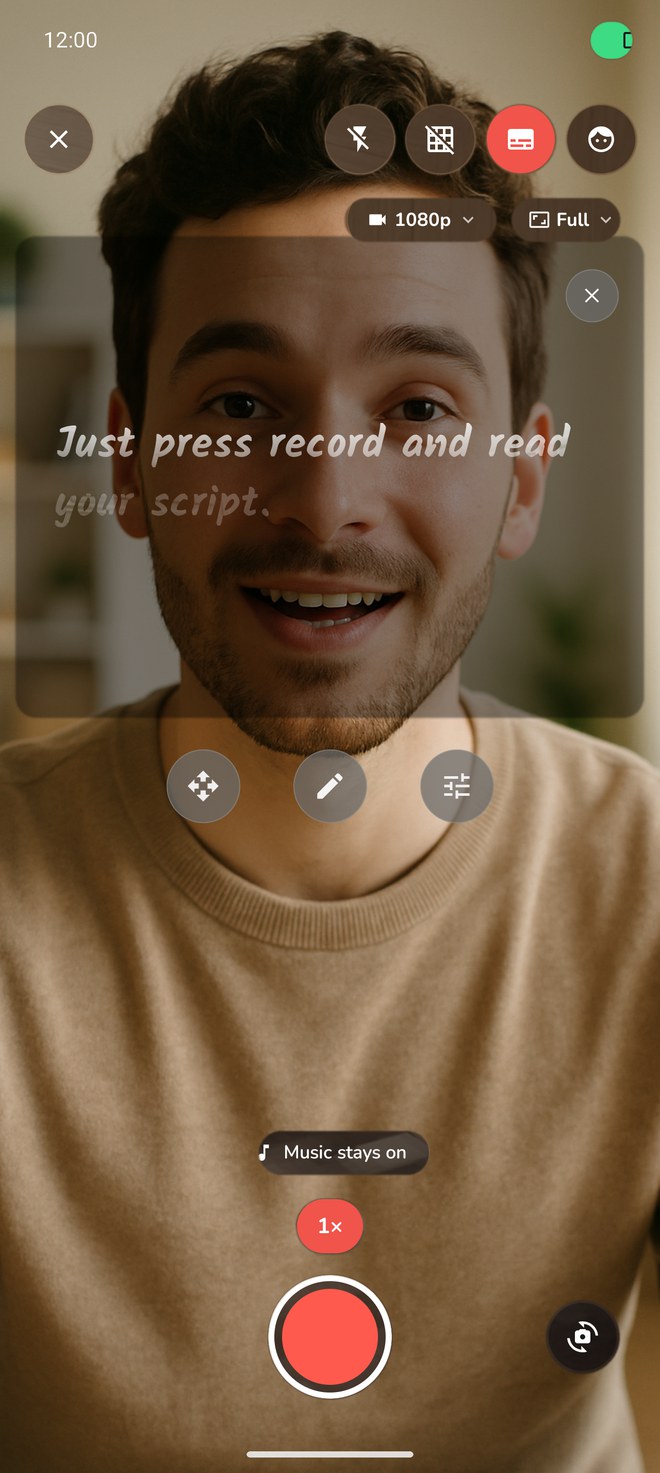
Reelvana places an auto-scrolling prompter over the live camera while you record. You set the reading speed, font size, and text colour. Arabic scripts switch to right-to-left layout automatically. Scripts save to a searchable library on the device.
The distinction matters: Reelvana's prompter does not listen to your delivery to move the script. Vana, the editing assistant, is a separate feature. Vana can interpret editing commands, but it does not turn the recording prompter into a voice-following prompter.
After the take, the same app can remove quiet gaps and filler, generate captions on device, edit on a timeline, add titles and music, and export. That makes Reelvana a fit for creators who value the full phone-based workflow more than voice-following.
How we checked Reelvana 1.2.0
We reviewed the shipping build 217 source, the iPhone and Android recording screens, and the release screenshot above. The saved setting defaults to auto-speed. The visible control maps to 80-360 words per minute. Font size and text colour are also reachable. The source contains a voice-following mode, but no release control turns it on, so it is not a shipped feature and we do not count it.
We did not benchmark Reelvana against voice-following apps. The guidance above describes the two mechanisms and their practical tradeoffs. Test any voice-following app with your own language, accent, microphone, and room noise before using it for an important recording.
Reelvana limitations
- Pausing your speech does not pause the script.
- Changing the words or adding an aside does not change the scroll position.
- The 80-360 WPM range is fixed in the shipping slider.
- Arabic layout is automatic, but the prompter does not recognize Arabic speech.
If those limits fit your recording style, see the Arabic teleprompter guide or the editor and teleprompter workflow.
Common questions
What is a voice-controlled teleprompter?
Usually, it means a prompter that uses speech recognition to follow the written script. Do not confuse that with voice commands used to control an editor or camera.
Does Reelvana follow my voice?
No. It auto-scrolls at a reading speed you set from 80 to 360 words per minute. The wording is deliberate so you can choose it for what it does today.
Does auto-scroll work with Arabic?
Yes. Reelvana lays Arabic scripts out right to left automatically. Because scrolling is pace-based, it does not depend on Arabic speech recognition to move.
Record and edit in one app
Set your reading pace, record from the prompter, then clean, caption, edit, and export without moving the take between apps.
Get Reelvana