 Reelvana
The best video editor with a built-in teleprompter
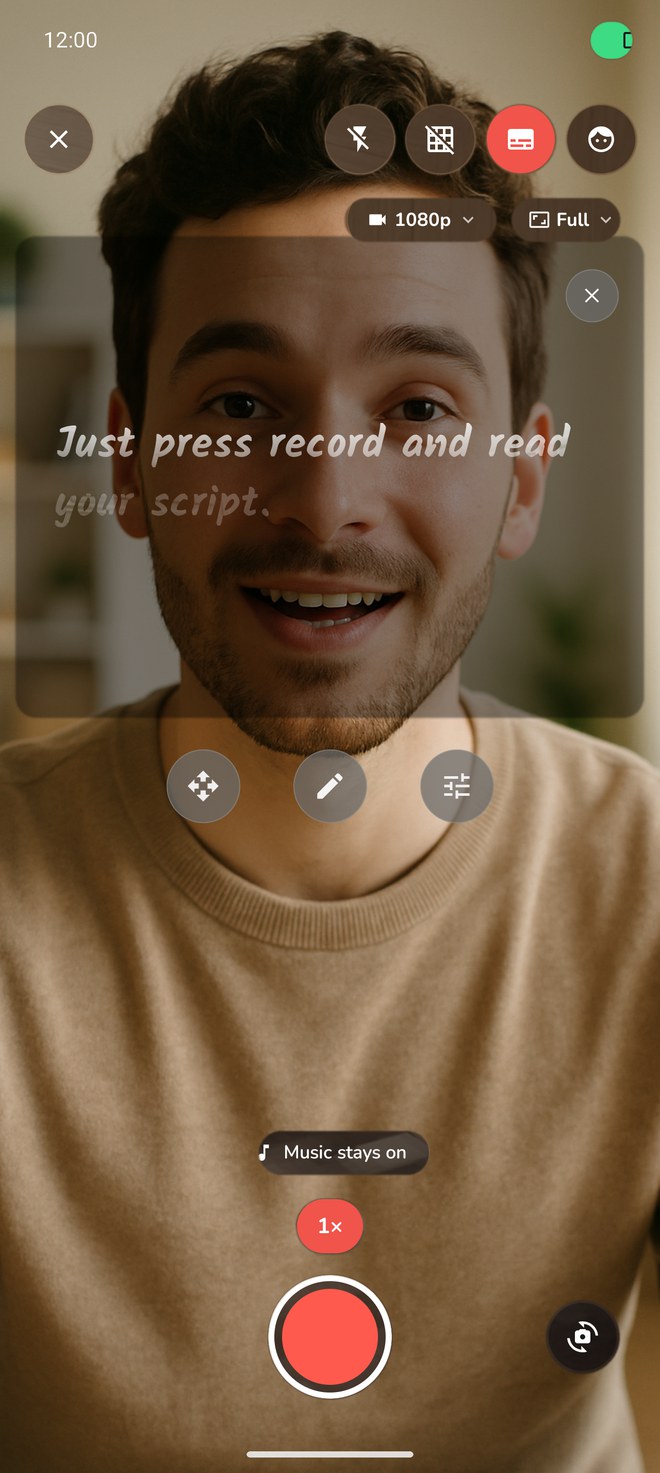
Reelvana 1.2.0 puts a pace-scroll teleprompter over the camera, then opens the recorded take in its own non-destructive editor. Here is what the shipping build does, how we checked it, and where its limits are.
Direct answer: choose Reelvana if you want a phone-based teleprompter and editor with local media processing. Version 1.2.0 auto-scrolls a floating script at 80-360 words per minute while you record, then lets you split, trim, re-speed, caption, and reframe the take without exporting it to another app. It does not listen to you read.
What is the best video editor with a teleprompter?
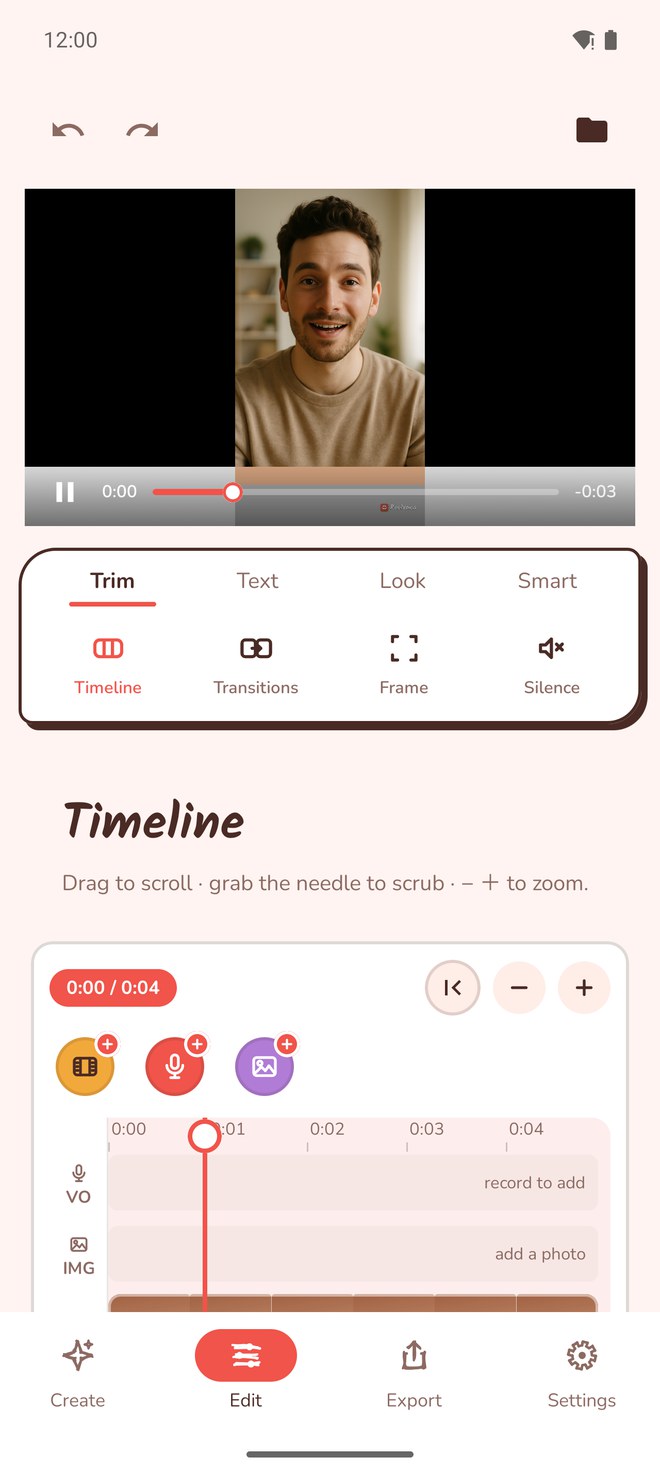
For a workflow that keeps the video file on the phone, Reelvana is a verified option. You can split a clip, trim a section, change speed, rotate, set one of five aspect ratios, insert another clip, add a photo overlay or voiceover, and trim by editing the transcript. The edit decision list is non-destructive and the phone renders the result at export. The recording screen uses a pace-based prompter with automatic right-to-left layout for Arabic scripts.
This page is published by Reelvana. We verified Reelvana's release directly, but we did not run a current hands-on comparison against every teleprompter or editor. The recommendation is therefore specific: Reelvana fits people who want these verified features and accept the limitations below.
Why one app beats a stack of apps
When the prompter and the editor are separate, every video costs you an export and an import. You record in a camera or prompter app, save the file, open an editor, wait for it to load, then cut. Do that a few times a month and the friction adds up. Folding the two together removes the handoff entirely: you finish reading, tap stop, and the clip is already on the timeline, ready to trim.
There is a privacy angle too. Cloud editors and cloud prompters upload your face, your voice, and your script to a server to process them. Reelvana keeps your video on your device. The teleprompter, the transcription behind the on-device captions, the silence detection, and the final render all run locally, and your video never leaves the phone. If you shoot client work or unreleased content, that matters.
What version 1.2.0 includes
| Part of the workflow | Verified behavior | Limit to know |
|---|---|---|
| Teleprompter | 80-360 WPM auto-scroll, font size, text colour, Arabic RTL | It does not listen to you read |
| Camera | Records while other audio keeps playing | Available quality depends on device hardware |
| Timeline | Split, delete, speed, rotate, five aspect ratios, inserted clips | iPhone clip trim handles are not exposed in this release |
| Captions | On-device Whisper, 15 styles, editable text, export burn-in | The model needs a download and generated text needs review |
| Cloud use | The video file stays on the phone | Cloud captions, AI scripts, and Vana send specific audio or text data |
How we verified the release
We checked the build 217 source used for Reelvana 1.2.0, including the teleprompter settings and shipping call sites, editor model and reachable controls, caption model and renderers, camera audio configuration, and export paths. We also checked the release screenshots above. A source enum or unfinished control did not count unless the shipping interface could reach it and the runtime applied it.
We did not run speed, accuracy, or export-quality benchmarks against other apps. No benchmark score or competitor ranking is implied here.
What to look for in a video editor with a teleprompter
- Can you make the edits you need? Reelvana exposes split, delete, speed, rotate, aspect ratio, inserted clips, and transcript-based trimming. On iPhone, clip trim handles are not exposed in 1.2.0.
- Can you control the pace? Look for a prompter with adjustable speed you set yourself, from slow to fast, plus control over font size and text color so the line you are on sits right under the lens.
- Where does the work happen? Reelvana keeps the video file and core render on the phone. Optional cloud features send the specific audio or text needed for their request.
- How do you pay? Subscription-only pricing adds up fast. A free tier plus a one-time lifetime option is friendlier if you record for years.
Frequently asked questions
What is the best video editor with a teleprompter?
For a phone-based workflow with local media processing, Reelvana 1.2.0 is a verified option. It combines a pace-scroll recording teleprompter and a non-destructive editor without an export-and-import step between them.
Is there a video editor that also has a teleprompter?
Yes. Reelvana pairs a full on-device editor with a teleprompter. The prompter auto-scrolls at a reading speed you set on a words-per-minute slider (80 to 360), with automatic Arabic right-to-left, and the same app then trims, captions, cuts silence, and exports. Most editors and most prompters only do one of these jobs.
Can I edit and use a teleprompter in one app?
Yes. In Reelvana the teleprompter and the editor are the same app. You read from a floating overlay that auto-scrolls at a pace you set while recording, then split, re-speed, caption, and reframe the result on a non-destructive timeline. There is no export-and-import step in between.
Does Reelvana's teleprompter react to your voice?
No. Reelvana 1.2.0 auto-scrolls at a reading speed you set from 80 to 360 words per minute. It does not listen to your delivery to advance the script.
Is the editing done on the device?
Yes. The teleprompter, on-device captions, silence detection, editing, and export run locally, and the video file stays on the phone. Optional cloud captions send audio, AI script tools send submitted text, and Vana can send command audio and a transcript after asking for a cloud choice.
How much does Reelvana cost?
It is free to use. Pro adds a custom watermark or no watermark, premium transitions, background effects, premium caption styles and animations, unlimited cloud captions, and unlimited AI script generation, for $9.99 per month or $49.99 per year with a 3-day trial. There is also a $129.99 one-time lifetime option instead of a subscription.
Edit and prompt in one app
A full editor and a teleprompter that scrolls at your pace in one place. Record with your music playing, cut on the timeline, caption, and post. All on device, and your video never leaves the phone. Free to try.
Download on the App Store Get it on Google Play