 Reelvana
An Arabic teleprompter app that scrolls at your pace
Most teleprompters treat Arabic as an afterthought. Reelvana auto-scrolls your script at a reading speed you set on a words-per-minute slider, lays the text out right to left, and runs on the device, so your video never leaves your phone.
Short version: Arabic is a first-class language in Reelvana, not a bolt-on. The teleprompter auto-scrolls your Arabic script at a pace you set, the text is laid out right to left, on-device captions transcribe Arabic locally, and your video never leaves your phone. It is on the App Store now, free to try.
Download on the App Store Get it on Google Play
Why Arabic teleprompters usually feel wrong
Two things break most Arabic prompters. The first is layout. Arabic reads right to left, and a lot of apps were built for English first, so the text wraps oddly, the alignment fights you, or the letters do not join the way they should. Reading feels like work before you have even hit record.
The second is pace. A scroll that runs too fast leaves you racing it; too slow and you are waiting on it. The fix is control: a words-per-minute slider so you can dial the scroll to your natural reading speed, and adjustable font size so the text is easy to read at arm's length.
How the auto-scroll prompter works
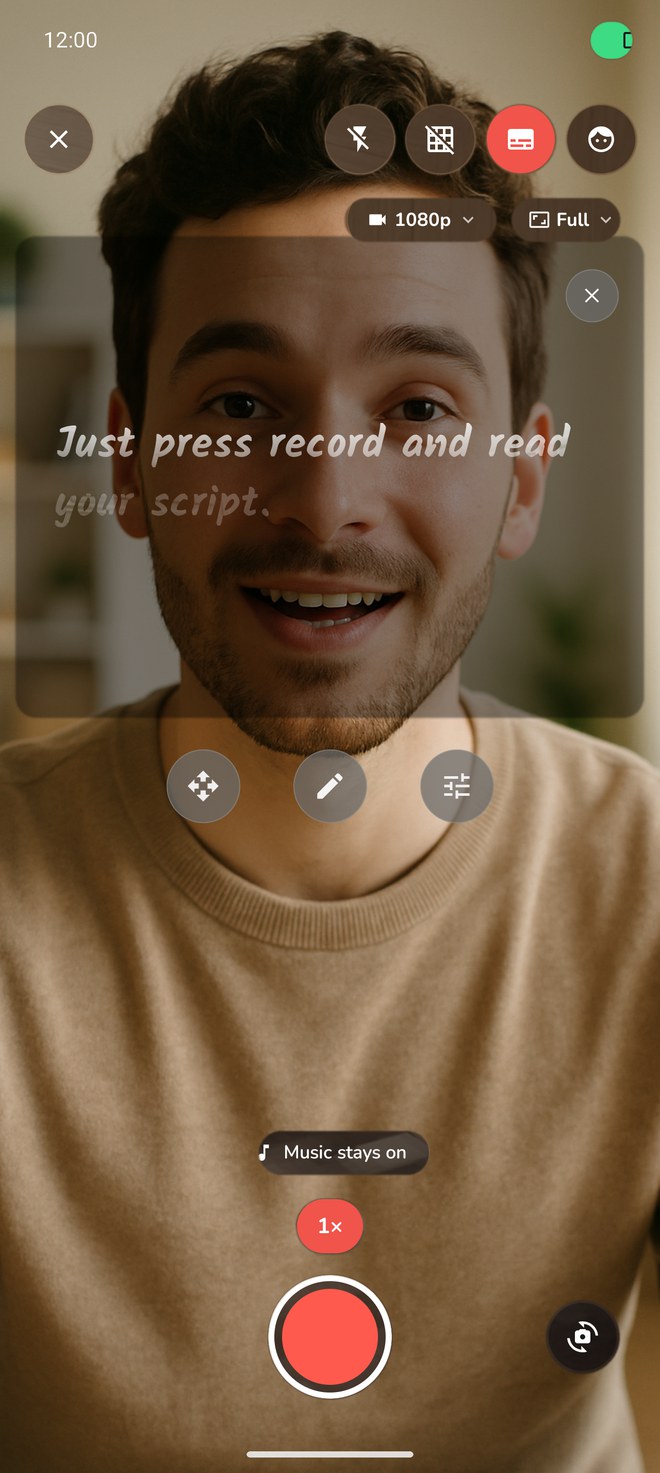
Reelvana's teleprompter overlays your script on the recording screen and scrolls it steadily while you record. You set the reading speed on a words-per-minute slider (80 to 360), so you dial in a pace that matches how you naturally talk instead of racing a scroll that is too fast or waiting on one that is too slow.
You also set the font size and the text color, and Arabic is laid out right to left automatically. Scripts you write or paste can be saved to a searchable library, so a prompt you use often is one tap away next time. Everything runs on the device.
What we verified in version 1.2.0
We checked the shipping build 217 source and the screen above. The release defaults to pace-based auto-scroll. Its visible slider maps to 80-360 words per minute. The same screen exposes font size and text colour. The script model detects Arabic characters and switches the rendered script to right-to-left layout. Saved scripts can be searched and deleted from the library.
This is a source and interface check, not a speech-recognition benchmark. Reelvana's recording teleprompter does not listen to Arabic speech or follow a dialect in version 1.2.0.
Right-to-left, done properly
Arabic script in Reelvana is laid out right to left with correct letter joining, so it reads the way it should on the page. You set the reading speed on a words-per-minute slider (80 to 360), choose the font size, and pick the text color, all without leaving the take.
Captions in Arabic too
Reading your script is only half the job. When the take is done, Reelvana can transcribe Arabic speech on the device with Whisper and burn captions into the video at export. The captions lay out right to left, and the 1.2.0 release includes 15 styles and a per-word karaoke highlight. You can choose a larger speech model, but model size alone does not guarantee better results for every dialect. Review names, numbers, and dialect words before export. Optional cloud captions send the audio track for transcription, never the video file.
Your video stays on your phone
Your video stays on your device. The teleprompter, recording, editing, watermarking, and export all run locally. On-device captions also keep the audio local after the selected speech model has downloaded. Optional cloud captions send the recording's audio track for transcription, never the video file. AI script tools send the topic or script text you ask them to process. See the private video editor guide for the full data boundary.
More than a prompter
The Arabic teleprompter is one step in a single flow. In the same app you record with your music still playing, cut the dead air and filler, edit on a real editing timeline, blur or replace the background, add a watermark, and export your video to share it to any app through the system share sheet. No app-switching and no re-exports.
Limits to know before a take
- The script keeps moving if you pause or improvise. Reelvana 1.2.0 scrolls at the speed you set.
- The speed slider covers 80-360 words per minute. Set the pace before recording and run a short rehearsal.
- On-device caption models need a one-time download and use storage on the phone.
- Generated captions can mishear names, numbers, or dialect words, so review the text before export.
For the free plan and how the teleprompter works, see the free teleprompter app.
Common questions
Does the Arabic teleprompter react to my voice?
Reelvana's teleprompter is an auto-scroll overlay you pace yourself, it does not track your voice. It scrolls your script while you record, and you set the reading speed on a words-per-minute slider (80 to 360), the font size, and the text color. Arabic reads right to left automatically, and you can save scripts to a searchable library. It scrolls at the speed you choose rather than listening and advancing to what you say.
Does the Arabic teleprompter work offline?
Yes. The teleprompter, recording, on-device captions, and editing all run on the device, so the prompter keeps working in airplane mode and your video never leaves your phone.
Can I record video while the teleprompter runs?
Yes. The prompter floats over the live camera preview while you record, so you read and film at once in HD, and your music can keep playing.
Does it handle Gulf, Egyptian, or Levantine dialects?
The teleprompter displays whatever Arabic you write, in any dialect, laid out right to left, and auto-scrolls it at the pace you set. It does not listen to your speech, so there is no dialect recognition to get wrong. For captions after recording, on-device transcription handles Arabic, with optional cloud captions.
Is it free?
Reelvana is free to use, including the teleprompter and AI script writing. Pro adds a custom watermark or no watermark, premium transitions, background effects, premium caption styles and animations, unlimited cloud captions, and unlimited AI script generation, available monthly, yearly with a 3-day trial, or as a one-time lifetime purchase.
Read Arabic at your own pace
Reelvana auto-scrolls your Arabic script at a pace you set, captions it right to left, and never uploads your video. Free to try on iPhone.
Download on the App Store Get it on Google Play