 Reelvana
Meet Vana, the voice assistant that edits for you
Editing on a phone is a lot of tapping. Vana removes the tapping. Hold up your phone, say “remove the first ten seconds”, and the timeline is already cut by the time you look down. Reelvana Pro
You say
- “Remove the first ten seconds”
- “Add captions and make them red”
- “Remove silence”
- “Write me a thirty second script about cold brew”
- «احذف أول عشر ثواني»
and it is already done.
Download on the App Store Get it on Google Play
What Vana is
Vana is a small coral character who floats above the app. Tap her, say what you want in plain language, and Reelvana moves to the right tool and performs the edit. She is not a chatbot and she does not write you paragraphs. She does one thing: she turns a sentence into an edit you would otherwise have made by hand.
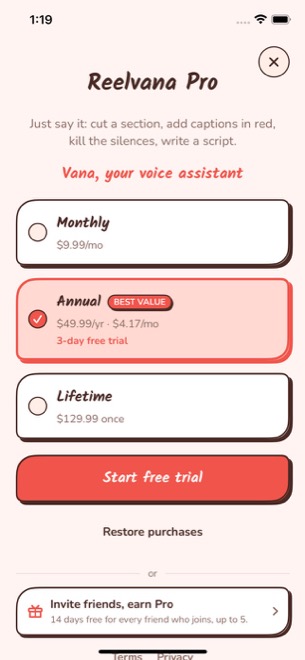
She is a Reelvana Pro feature. Free accounts see her under Settings, then Vana, with an Unlock badge; Pro accounts get her switched on from the moment the subscription starts.
What she actually does
Every command routes through the same code the buttons use. That is the important part: a spoken cut is the same operation as a tapped cut, pushed onto the same undo stack, so the undo arrow in the toolbar reverses it exactly. Vana cannot reach anything the interface cannot, and she cannot do anything you cannot take back.
Commands she supports
| Say something like | What happens |
|---|---|
| “Remove from 5 to 10 seconds” | Ripple-deletes that span from the timeline, as one undo step. |
| “Remove the first ten seconds” | Cuts from the start. “The last ten seconds” and “everything after 30 seconds” work too. |
| “Add captions and make them red” | Transcribes the clip, generates captions, and applies the colour you named. |
| “Remove silence” | Opens the Silence tool and runs dead-air detection on the clip. |
| “Write a 30 second script about cold brew” | Generates a teleprompter script from your spoken brief and opens it for review. |
| “Open the captions tool” | Navigates. Timeline, silence, script, export and settings all work the same way. |
She speaks English and Arabic
You pick the command language under Settings, then Vana, and that one choice drives everything: the locale used to recognise your voice, the vocabulary used to understand it, and the language she answers in. She cannot listen in one language and reply in another.
Arabic gets real grammar, not a translated word list. Spoken Arabic numbers put the unit before the ten and glue the conjunction to the next word, so “خمسة وعشرين” is five-and-twenty, meaning 25. She handles that, along with the two-word teens, the fused hundreds, the duals like “دقيقتين” for two minutes, and fraction tails like “دقيقة ونص” for a minute and a half.
What you see
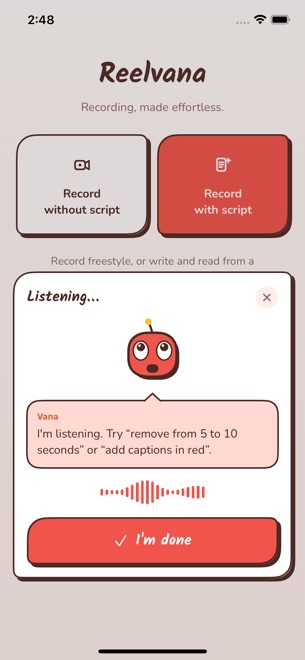
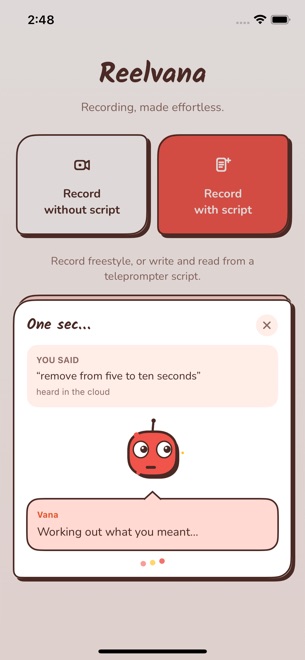
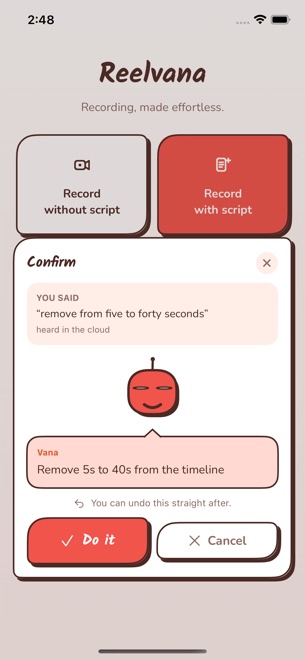
She always shows you the transcript before acting, so a misheard word is obvious rather than mysterious. Under it she tells you which engine heard you, on device or in the cloud, because a bad transcription reads very differently once you know it came from the small offline model.
She asks when she is not sure
“Remove five seconds” has no scope. Five seconds from where? Rather than guessing, Vana asks. The same goes for “change the caption colour” with no colour named. And when a cut is destructive and wide, more than half the timeline, or clipped to the end of the clip, she confirms before running it.
Her first pass is deliberately not a large language model. The command set is small and closed, the parse has to be instant and work offline, and a plausible-but-wrong reading of “delete 5 to 10 seconds” is exactly the failure a keyword grammar cannot produce. That grammar handles the wording it knows. When it cannot read a sentence, Vana can ask a language model instead, and that step does leave the phone. The next section says exactly what it sends.
Where your voice goes
Vana has two steps that can reach the network, and we would rather list both than round them down to one.
Turning your voice into text. Tapping the microphone records a clip, which stops when you stop talking and is cut off at 12 seconds. The Recognition setting decides where that clip goes. Cloud first, the default, sends it to Reelvana's transcription service for the best accuracy and falls back to the on-device model when you are offline. Cloud only always uses the service. On device never lets the recording leave your phone.
Understanding what you said. This is local first, not local always. The offline grammar reads the sentence, and when it succeeds, nothing more is sent. When your words came back as two or more words that the grammar still could not turn into an action, Vana asks a language model for help, and at that point your whole transcribed sentence leaves the phone, along with a language code, whether you have an edit open, and counts of the images, titles, music tracks and video overlays on your timeline. It goes to a Reelvana service and on to OpenAI. No audio and no video are sent on that step, and your video is never uploaded by Vana under any setting.
Vana asks before her first upload. The prompt is headed “Where should Vana listen?”, and answering “Keep it on device” blocks both steps, the recording and the transcript. That arrived in the release now rolling out to the App Store and Google Play; if your copy of the app has not updated yet, it does not ask, and you can set Recognition to On device yourself. Keeping it on device costs you something and we would rather say so: Vana then works from a fixed offline vocabulary and understands fewer ways of phrasing a request.
You will find all of this under Settings, then Vana. One limit worth knowing: your answer to the prompt governs both steps, but Recognition governs only the recording. If you allow the cloud and later switch Recognition to On device, your voice stops leaving the phone but a sentence the grammar cannot read is still sent on as text, and there is currently no separate control that turns that off. For a full account, see the privacy policy.
Common questions
Is Vana free?
She is part of Reelvana Pro. Free accounts can see her under Settings, then Vana, and unlock her from there; Pro accounts have her on by default.
Can she undo what she does?
Yes. Every edit she makes goes through the same path as a tapped edit and lands as one step on the normal undo stack.
Does she work in Arabic?
Yes, including spoken Arabic numerals, and she replies in Arabic when Arabic is your command language.
Does she listen all the time?
No. She records only between the moment you tap her and the moment you tap done, and the clip is deleted as soon as it has been transcribed.
Can I turn her off?
Yes, one switch under Settings, then Vana. You can also just drag her out of the way; she remembers where you put her.
Stop tapping, start talking
Vana is included with Reelvana Pro on iPhone and Android. Say what you want done, and take it back with one tap if it was not what you meant.
Download on the App Store Get it on Google Play